

Ring No Answer
Separate agent ringing attempts from incoming calls and compare their causes and durations.
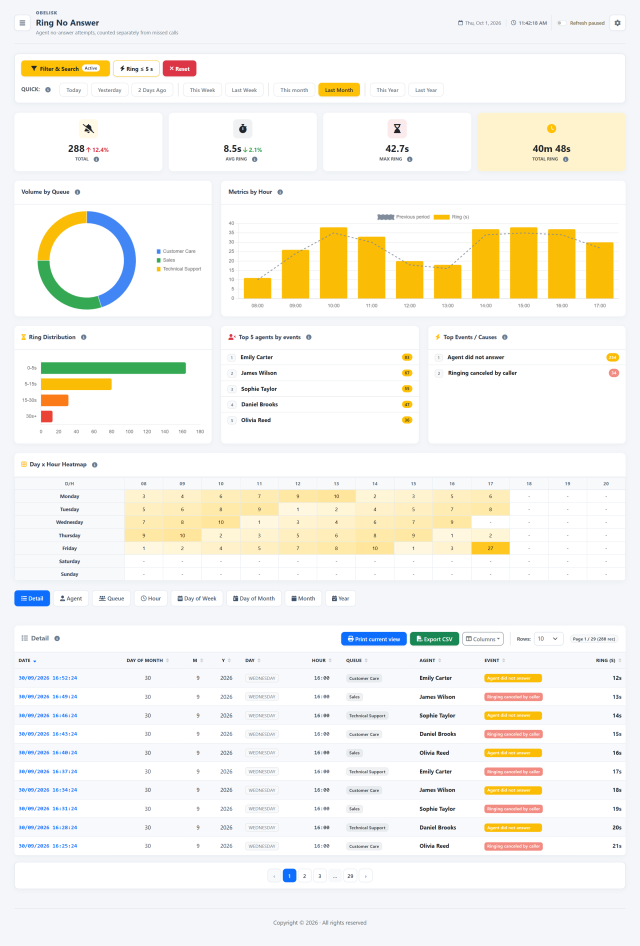
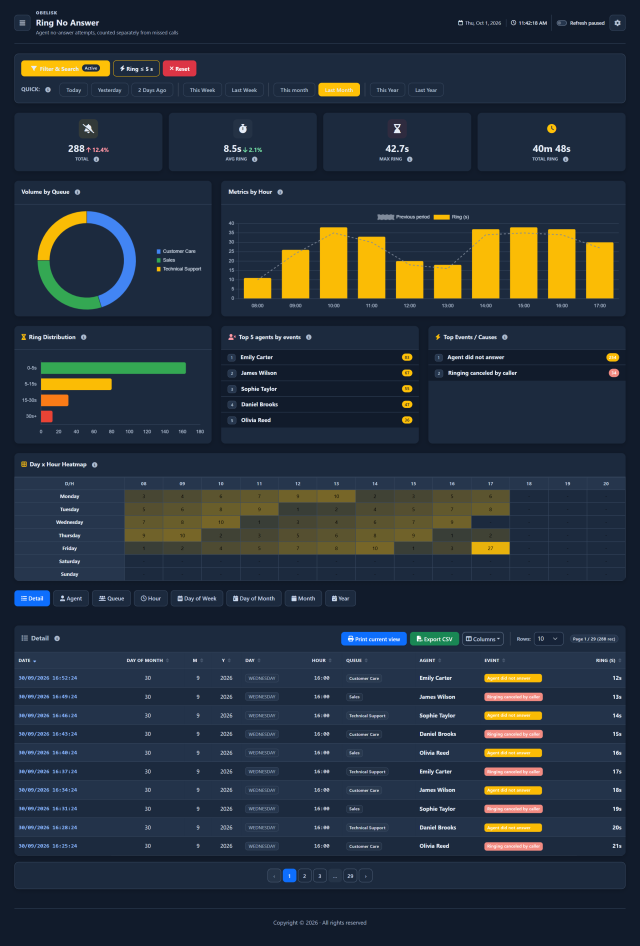
Slide the divider to compare the same workspace.
DarkChoose what to analyse. Then how to read it.
A simple data warehouse principle: facts describe what happened, measures tell you how much, and dimensions organize the result. In the report, combine your period and filters, then choose the grouping that answers your question.
One report. Every available perspective.
Examine attempts by agent, queue or period. Switch from monthly trends to team details and compare the number and duration of unanswered rings.
Call details
Read each unanswered ringing attempt with the queue, agent, event and ringing duration.
By agent
Compare unanswered ringing attempts and ringing times by agent.
By queue
Compare unanswered ringing attempts and ringing times by queue.
By hour
Compare unanswered ringing attempts and ringing times by hour of the day.
By day of month
Compare unanswered ringing attempts and ringing times by day number within the month.
By day of week
Compare unanswered ringing attempts and ringing times by day of the week.
By month
Compare unanswered ringing attempts and ringing times by month.
By year
Compare unanswered ringing attempts and ringing times by year.
Facts and measures: what happened
Each unanswered ringing attempt is a recorded event. Its measures include the number of attempts and their ringing duration.
Dimensions: how to group it
Time, queue and agent organize the attempts, so you can compare activity across periods and people.
Filters: where to focus
Choose one or more queues and agents, then refine the dates, hours and events to focus on the activity you need.
Same period. A different perspective.
One selected queue, optionally one agent
One row for each month in the selected year, with the report measures summarized month by month.
One row per agent, with unanswered ringing attempts and their durations for the same selected year.
Keep your selection and change the grouping to compare another dimension. Combine the filters to focus the same analysis further.
The controls, up close.
Search
Select queues and agents, then define the period, hours and events to examine. The combined criteria focus the report on the selected team and activity.
Quick filters
Compare preset periods and highlight short rings to identify attempts worth investigating.
Know what to look for.
Unanswered attempts and ringing time
Compare the number of unanswered attempts with average, maximum and total ringing time. A single incoming call can generate several attempts towards agents.
Queue distribution and hourly trends
Compare the queues involved and read the hourly chart alongside the previous-period series. Use grouping and filters to focus on the agents, queues or time slots you want to examine.
Ringing bands, agents and events
Read the ringing-time distribution, the five agents with the most unanswered attempts and the recorded events together. Distinguish cancelled ringing from ring-no-answer events to understand the pattern.
When unanswered attempts concentrate
Cross weekday and hour to locate recurring concentrations of unanswered attempts. Compare those slots with agent availability and queue organisation.
Every unanswered attempt in detail
Read date, queue, agent, event and ringing duration for each attempt. Group the results to compare agents or periods, then use the column selector, print view or CSV export.
Read the signal.
Choose the next step.
Understand the effect of ring-all
When a queue rings several agents together, one answer can cancel the ringing on the other endpoints. Compare cancelled rings with unanswered attempts and their durations before drawing conclusions about agent availability. Queue Routing Log lets you inspect the surrounding events of an individual call.
An incoming call can ring several agents before it is answered. Use this report to understand those attempts without counting them as additional incoming or missed calls.
Put it to work
Select the event period, queues and agents to inspect unanswered and cancelled ringing attempts.
Compare average, maximum and total ringing time, then examine the duration bands and operators with the largest volumes.
Use hourly heatmaps and event detail to understand repeated attempts within calls, then export or print the filtered result.
What you can do
Two kinds of event
Analyze RINGNOANSWER and RINGCANCELED events.
Ringing time, measured
Measure average, maximum and total ringing duration.
Compare agents and queues
Group by agent, queue, hour, day, weekday, month and year.
See patterns at a glance
Ring buckets, top five involved agents, event causes and weekday/hour heatmap.
Focus and share
Filter queues/agents/date/time and focus on short rings; print or export filtered results.
Read the detail with confidence
One phone call may create several ringing attempts and later be answered.
One phone call may create several ringing attempts and later be answered.
These events are not missed-call counts and do not add to incoming volume.
These events are not missed-call counts and do not add to incoming volume.
Period follows the time each ring attempt ends.
Period follows the time each ring attempt ends.