

Action centre
Manage follow-up work with explicit ownership, priority, deadlines, notes and recorded contact attempts.
Every case needs a next step.
The Action centre turns situations that need attention into work your team can follow. It brings the reason for the task, the person responsible and the history of what has been done into one place.
- 01
Read the signal
Repeated missed calls or a saved analysis highlight a case to review.
- 02
Decide what to do
Check the context and confirm the observation as a task.
- 03
Assign responsibility
Choose an owner, set a priority and agree on a deadline.
- 04
Follow through
Record notes and contact attempts, then close with an explicit outcome.
A customer has tried to reach you several times.
The contextCheck the call path and any saved analysis.
The taskAssign the follow-up and record each contact attempt.
The outcomeRecord whether the issue is resolved, escalated or still needs work.
Reaching the customer does not automatically close the case: the contact attempt and the outcome are separate.
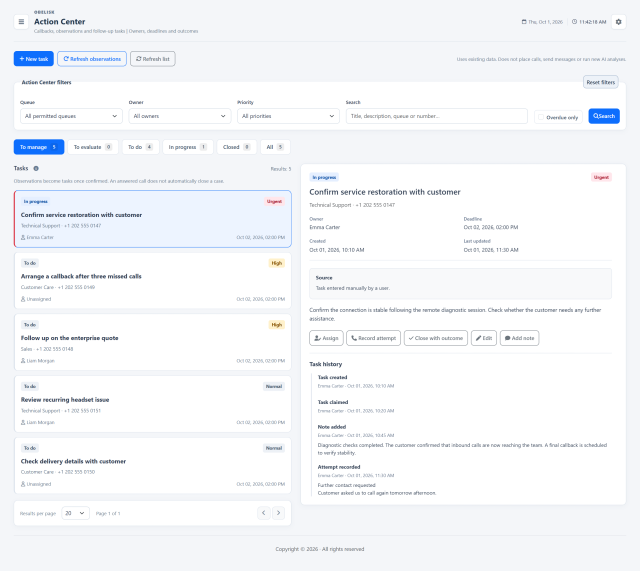
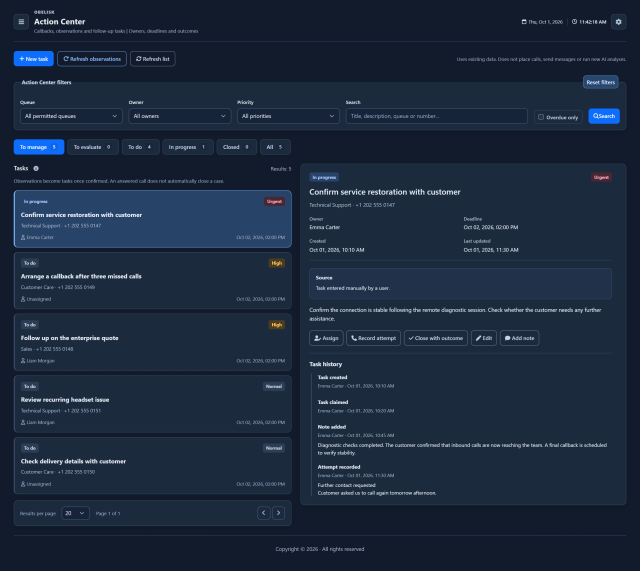
Slide the divider to compare the same workspace.
DarkUnderstand the call. Act on the case.
From the task, open the available source information: less time reconstructing what happened, more context for deciding the next step.
The existing call analysis
When the case is linked to an analysed recording, you can open the saved analysis. Review the summary, outcome, reported issues and available conversation details before taking action. Opening the existing result does not request another AI analysis.
Explore recordings and call analysisThe Routing log
The direct link opens the Routing log for the relevant day and call, when the reference is available. Follow queue events, waiting and routing steps to understand how the contact was handled and why it needs attention.
Explore the Routing logThe links use the references attached to the case and follow the account’s permissions for Routing log and Recordings.
Know what to look for.
Task context
Keep the owner, deadline, saved analysis and reported issues together.
Task history
Follow confirmations, assignment changes, contact attempts and notes.
Refresh observations
Select the period used to find repeated missed calls and signals from saved analyses.
More views and details 2
Case history
Keep ownership, notes, contact attempts and the next operational action together in the case view.
Priorities and deadlines
Use the case list to identify assigned work, pending tasks and approaching deadlines.
Read the signal.
Choose the next step.
Understand why a case is suggested
Observations can flag at least three missed calls from the same number to the same queue on one day, or saved analyses with an unresolved outcome, an escalation request or high churn risk. Review the evidence before confirming the follow-up and assigning responsibility.
Keep the attempt and the outcome separate
Reaching a person may still leave work to do. Record the contact attempt and its notes while the task remains open, then close it with an explicit outcome when the case is resolved, escalated or otherwise completed. The history preserves how that decision was reached.
Turn a missed-contact observation into a task, assign it to a colleague and record contact attempts. A clear outcome makes the next review more useful than a list of unresolved observations.
Put it to work
Retrieve repeated missed calls and unresolved or high-risk AI findings from the selected period without starting a new audio analysis.
Review the source context, create or accept an activity, and assign its owner, priority and due date.
Record notes and contact attempts, close with an outcome or reopen the activity while retaining its history.
What you can do
Start from an observation
Review observations derived from existing call and analysis data.
Create an accountable task
Confirm observations as tasks or create manual tasks.
Give work an owner
Assign owners, priorities and due dates; filter by status, owner and queue.
Keep the follow-up history
Record notes and contact attempts, close with an outcome or reopen.
Return to the evidence
Keep task history and open the Routing log and existing call analysis from the case.
Read the detail with confidence
Does not place calls, send messages or run new AI analysis.
Does not place calls, send messages or run new AI analysis.
An answered call does not automatically close a task.
An answered call does not automatically close a task.
Actions and queue access are permission-controlled.
Actions and queue access are permission-controlled.