

Queue Routing Log
Follow chronological queue events and compare the transitions represented by the current call sample.
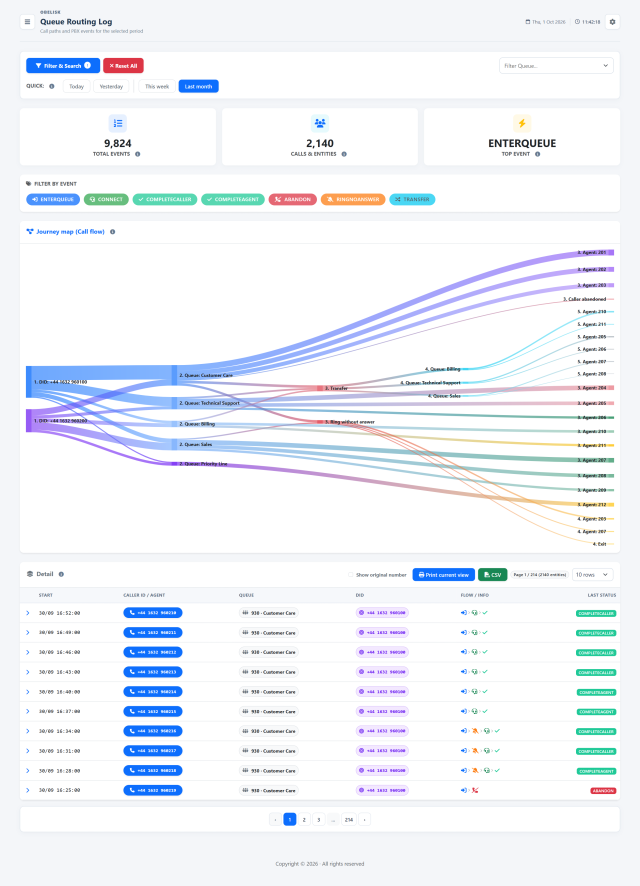
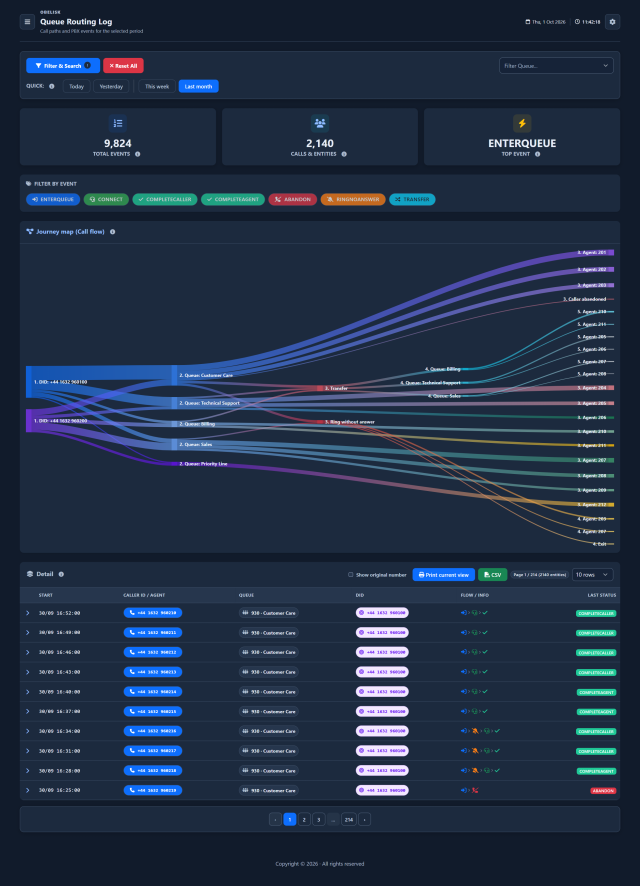
Slide the divider to compare the same workspace.
DarkKnow what to look for.
Event overview and focused filters
Start with total events, calls and entities, and the most frequent event. Select an event badge to focus the search on queue entries, answers, completions, abandonment, unanswered attempts or transfers.
Follow the observed call paths
The flow map connects incoming numbers, queues, agents, transfers and exits. Read the routes together to see where calls move and which paths carry the most activity.
Open the timeline of each call
Expand a row to follow the ordered events of a call, with queue, agent, timing and final status. Where available, open the linked recordings; use print and CSV to share the results.
Open the call. Follow what happened.
A compact row brings together the caller, queue, visual path and final event. Open it to read the chronological sequence: entry, ringing attempts, connection, transfers and exit events recorded for that call.
Example call · Customer CareOpen the call Close the detail 
Native product screens with fictional example data. Select the expanded image to read each value at full size.
Read this call in four steps.
Enter the queue
The call enters Customer Care in position 3. The log preserves its original caller number and call ID.
A missed attempt
Emily Carter does not answer after 12 seconds of ringing. This is one attempt within the call’s path; the call continues.
The agent answers
James Wilson answers. The recorded wait is 18 seconds, with 4 seconds of ringing for this connection. The member unique ID links the answered leg.
The conversation ends
The agent ends the conversation after 226 seconds. Read the closing event together with wait time and original queue position.
One call can cross several queues
The initial filters select calls. Obelisk then brings together all stored events for each selected call ID, including events outside the initial period or queue selection, to preserve its recorded sequence.
An event explains a transition
ABANDON means the caller left before an answer; EXITWITHTIMEOUT means the queue’s waiting limit was reached. RINGNOANSWER describes an unanswered agent attempt, so it can appear before a later successful connection.
Every code has a meaning.
Explore the 32 event codes recognized by Obelisk. For each one, read its meaning and the recorded parameters in Info field order. Values appear when Asterisk or the dialplan writes them and the event is imported.
The call, step by step6
ENTERQUEUECaller enters the queue.
Caller name is populated when caller-name logging is enabled in the queue configuration.
- Info 1URL
- URL associated with queue entry, if supplied.
- Info 2Original CallerID
- Original CallerID written by Asterisk in ENTERQUEUE. This technical value is not normalized in this table.
- Info 3Initial position
- Position assigned on queue entry.
- Info 4CallerID name
- Caller name, present when enabled in queue logging.
RINGNOANSWERMember does not answer this ringing attempt.
The duration is in milliseconds: 12000 means 12 seconds. The caller may still be waiting for another agent.
- Info 1Ring time (ms)
- Ringing-attempt duration in milliseconds.
RINGCANCELEDCaller hangs up while the member is ringing.
- Info 1Ring time (ms)
- Ringing-attempt duration in milliseconds.
CONNECTCaller connected to a member.
- Info 1Wait (s)
- Seconds in queue before answer or exit.
- Info 2Member UniqueID
- UniqueID of the connected member channel, not a telephone number.
- Info 3Ring time (s)
- Answering member’s ring duration, in seconds.
COMPLETEAGENTMember ends the answered call.
- Info 1Wait (s)
- Seconds in queue before answer or exit.
- Info 2Talk time (s)
- Conversation duration with the member, in seconds.
- Info 3Initial position
- Position assigned on queue entry.
COMPLETECALLERCaller ends the answered call.
- Info 1Wait (s)
- Seconds in queue before answer or exit.
- Info 2Talk time (s)
- Conversation duration with the member, in seconds.
- Info 3Initial position
- Position assigned on queue entry.
Exits and transfers10
ABANDONCaller leaves the queue before answer.
- Info 1Exit position
- Queue position when leaving.
- Info 2Initial position
- Position assigned on queue entry.
- Info 3Wait (s)
- Seconds in queue before answer or exit.
EXITWITHTIMEOUTCaller reaches the queue waiting-time limit.
- Info 1Exit position
- Queue position when leaving.
- Info 2Initial position
- Position assigned on queue entry.
- Info 3Wait (s)
- Seconds in queue before answer or exit.
EXITEMPTYCaller leaves because members are unavailable under the queue configuration.
Depends on the queue’s leave-when-empty rules and the availability of eligible members.
- Info 1Exit position
- Queue position when leaving.
- Info 2Initial position
- Position assigned on queue entry.
- Info 3Wait (s)
- Seconds in queue before answer or exit.
EXITWITHKEYCaller leaves by pressing a key.
The exit key must be handled by the queue’s configured exit context.
- Info 1Exit key
- Key pressed by the caller to leave the queue.
- Info 2Exit position
- Queue position when leaving.
- Info 3Initial position
- Position assigned on queue entry.
- Info 4Wait (s)
- Seconds in queue before answer or exit.
WITHDRAWCall withdrawn from the queue by a withdrawal request.
- Info 1Exit position
- Queue position when leaving.
- Info 2Initial position
- Position assigned on queue entry.
- Info 3Wait (s)
- Seconds in queue before answer or exit.
- Info 4Withdrawal data
- Optional information attached to the withdrawal request.
TRANSFERTransfer recorded using the legacy TRANSFER format.
- Info 1Destination
- Extension or dialplan destination receiving the transfer.
- Info 2Context
- Destination dialplan context.
- Info 3Wait (s)
- Seconds in queue before answer or exit.
- Info 4Talk time (s)
- Conversation duration with the member, in seconds.
- Info 5Initial position
- Position assigned on queue entry.
BLINDTRANSFERBlind transfer to the recorded extension and context.
- Info 1Destination
- Extension or dialplan destination receiving the transfer.
- Info 2Context
- Destination dialplan context.
- Info 3Wait (s)
- Seconds in queue before answer or exit.
- Info 4Talk time (s)
- Conversation duration with the member, in seconds.
- Info 5Initial position
- Position assigned on queue entry.
ATTENDEDTRANSFERAttended transfer. Fields depend on the method: LINK contains two channels; original position is field six, beyond the stored Info 1–5.
For LINK, Info 1–5 contain method, first channel, second channel, wait and talk. The original position is a sixth parameter, beyond the five stored Info fields. Other methods use the field order below.
- Info 1Method
- Attended-transfer method: BRIDGE, APP or LINK.
- Info 2Method data
- Destination bridge identifier or application name.
- Info 3Wait (s)
- Seconds in queue before answer or exit.
- Info 4Talk time (s)
- Conversation duration with the member, in seconds.
- Info 5Initial position
- Position assigned on queue entry.
AGENTDUMPMember rejects the call during the initial announcement.
No event-specific parameters in the catalog. Any original Info values remain visible.
SYSCOMPATConnection fails because the channels are incompatible.
No event-specific parameters in the catalog. Any original Info values remain visible.
Agents and queue membership8
ADDMEMBERA member is added to the queue.
- Info 1Initial pause
- PAUSED means the member was added in a paused state.
REMOVEMEMBERMember removed from the queue.
No event-specific parameters in the catalog. Any original Info values remain visible.
PAUSEMember paused in this queue.
- Info 1Reason
- Reason recorded by Asterisk; may be empty.
UNPAUSEMember unpaused in this queue.
- Info 1Reason
- Reason recorded by Asterisk; may be empty.
PAUSEALLPause requested across the member’s queues.
Applies when a pause is requested without specifying one queue. Individual queue events may accompany it.
- Info 1Reason
- Reason recorded by Asterisk; may be empty.
UNPAUSEALLUnpause requested across the member’s queues.
Applies when resuming without specifying one queue. Individual queue events may accompany it.
- Info 1Reason
- Reason recorded by Asterisk; may be empty.
PENALTYMember’s queue penalty changed.
- Info 1Penalty
- New penalty assigned to the queue member.
RINGINUSERinging an already busy member is enabled or disabled.
- Info 1Ring while busy
- 1 allows ringing while the member is busy; 0 disables it.
System and legacy events6
QUEUESTARTQueue subsystem starts.
No event-specific parameters in the catalog. Any original Info values remain visible.
CONFIGRELOADQueue configuration reloaded.
No event-specific parameters in the catalog. Any original Info values remain visible.
AGENTLOGINAgent logs in on the recorded channel.
- Info 1Channel
- Asterisk channel name recorded by the event.
AGENTLOGOFFAgent logs out; login duration is recorded.
- Info 1Channel
- Asterisk channel name recorded by the event.
- Info 2Login duration (s)
- Agent login duration in seconds.
AGENTCALLBACKLOGINAgent callback login: a legacy event.
- Info 1Callback destination
- Extension and context used for agent callback.
AGENTCALLBACKLOGOFFAgent callback logout: a legacy event.
- Info 1Callback destination
- Extension and context used for agent callback.
- Info 2Login duration (s)
- Agent login duration in seconds.
- Info 3Reason
- Reason recorded by Asterisk; may be empty.
Optional and custom events2
OUTCALLOutbound call update recorded by QueueUpdate.
Written by QueueUpdate when the dialplan uses it to record an outbound call. It is not automatically present for every outbound call.
- Info 1Outcome
- Call outcome supplied to QueueUpdate.
- Info 2Talk time (s)
- Conversation duration with the member, in seconds.
- Info 3Additional data
- Additional parameters supplied to QueueUpdate; original values remain unchanged.
DIDCustom dialplan event used by Obelisk for the called number. It is not a standard app_queue event.
Requires the corresponding custom event to be emitted by the dialplan and imported.
- Info 1Called number
- Destination number recorded by the dialplan in the DID event.
Read the recorded path in its context.
- The timeline follows stored queue events. Transfers performed directly by a phone may not produce a queue-log transfer event; Asterisk’s built-in transfer mechanism is the documented way to record it.
- System and membership events describe queue operation; they are not necessarily part of a caller’s conversation. Legacy login events remain readable when present in imported history.
- Custom or unrecognized event names and original Info 1–5 values remain available, without assigning them a meaning that the catalog does not define.
Read the signal.
Choose the next step.
Read a transfer as one continuous story
A transfer can span two queues, two agents and several recording segments. Expand the call to read its chronological events together, including the context needed to preserve the path, then open the available audio segments at the relevant stages.
Match the map to the question
The flow map describes the calls loaded on the current page, making it useful for inspecting their paths. For queue-to-queue frequencies across the full filtered result, continue to Contacts and journeys, then return to the routing timeline for the individual cases behind a pattern.
A caller reaches Customer Care, waits, moves to Technical Support and is answered. Open the call’s event sequence to understand each recorded stage and listen to the available recording segments.
Put it to work
Search by call or choose queues and events to narrow the routing history to the case you are reviewing.
Open a call row to read its sequence, queue context, DID and last state, with original Asterisk event codes available.
Continue into linked audio and saved analysis when authorized, or export and print the filtered event report.
What you can do
Find the exact call
Search by period, queue, event, call ID and exact original or normalized number.
Keep the complete path together
Group events by call identifier to reconstruct paths across queues.
See the flow
Sankey-style flow map summarizes event transitions in the loaded call paths.
Read the original events clearly
Expandable chronological event details retain original Asterisk codes with translated meanings and field explanations.
Bring recordings into the story
Open linked recording segments and existing AI analysis, subject to independent permissions.
Export the sequence
CSV includes complete event sequences of selected calls; print includes visible event detail.
Read the detail with confidence
Historical analysis, not dialplan configuration.
Historical analysis, not dialplan configuration.
How should I interpret this?
Flow represents calls on the current page, not necessarily the entire filtered period.
What context matters?
Selected call details may include events outside initial date/queue filters to preserve the full path.