

Operational views
Organize queues and extensions, choose visible resources and configure privacy for shared live views.
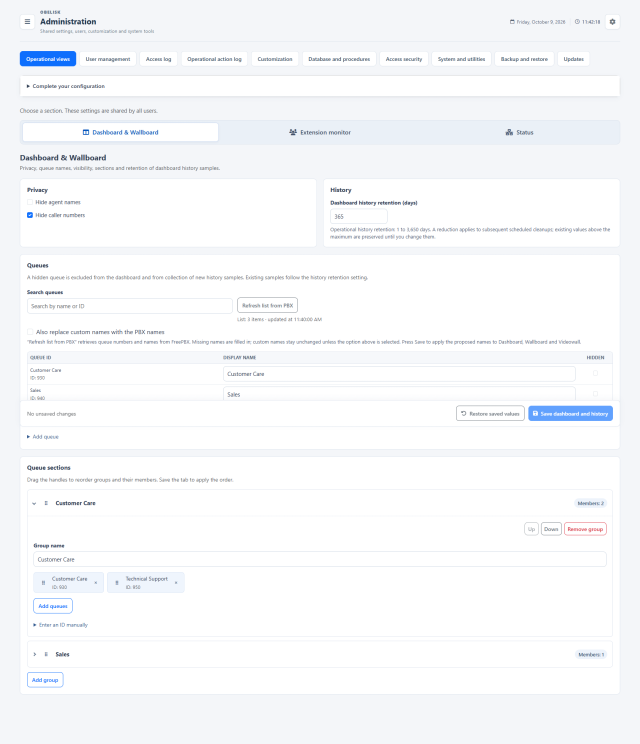
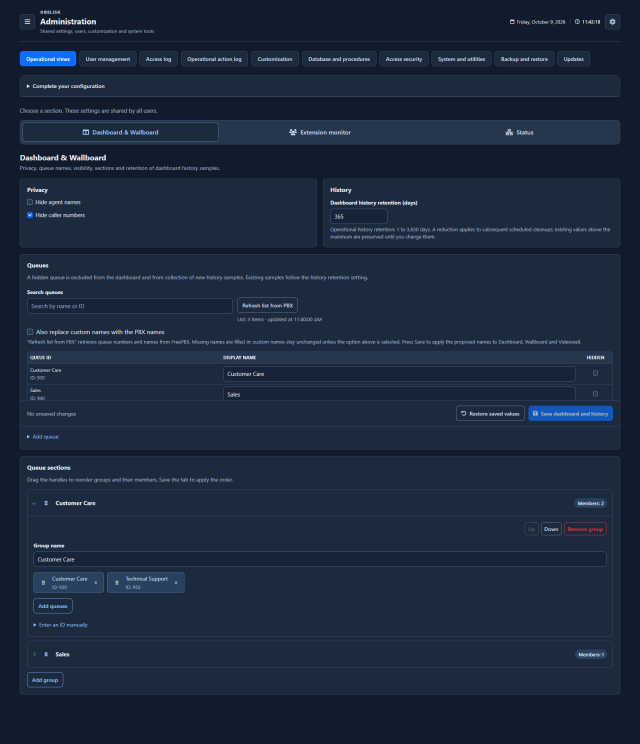
Slide the divider to compare the same workspace.
DarkBuild the view around your contact centre.
Create shared sections for queues and groups for extensions. Give every team a clear starting point, then choose which resources each account can see.
One organisation, three queue views
Group queues by department, service or customer: the shared organisation supports Dashboard, Wallboard and Videowall. Reorder groups and their queues with drag and drop.
Extension groups for each operational view
Build Monitor and Status groups independently: for example, the support agents in Monitor and the phones of a specific site in Status.
Try building a group
Choose a view, name the group and select its members. The example updates immediately; in Obelisk, save the relevant administrative section to share the configuration.
Customer care team
Select the resources to include.
Dashboard · Wallboard · VideowallSupport desk
Select the resources to include.
Monitor groupsHead office phones
Select the resources to include.
Status groupsReadable names. Controlled visibility.
Give a queue a useful alias in Obelisk while keeping its FreePBX configuration. Hide queues or extensions from shared views, and choose the privacy settings appropriate to each workspace.
queue_support_01Customer assistanceQueue views can hide agent names and waiting caller numbers. Monitor adds masking of call numbers; Status has its own setting for agent names. These controls support the way you manage personal data in live operations.
Assign live-view groups and individual resources in Users. The Team Leader then personalises the permitted workspace: order, personal hiding and alert thresholds.
Choose who sees what Explore personal preferencesWhat you can do
A clear Dashboard structure
Configure Dashboard privacy, aliases, hidden queues, sections and order.
Monitor groups and privacy
Manage Monitor groups, exclusions and privacy.
Status visibility
Configure Status groups/exclusions and visibility.
Inventory with review
Pull optional PBX inventory to aid configuration; maintain drafts and revision checks.
Keep your queue inventory current
Refresh the queue inventory from FreePBX and Asterisk while retaining your aliases and visibility choices.